7 things you’ll finally know about your money before payday.
Cashflow Calendar turns your paycheck and bills into a day-by-day forecast of your bank balance — so you can see the tight days coming and plan around them. It runs on your own computer, and your numbers never leave it.
- Runs on your computer
- No account or bank login
- Works offline
Your bank shows you today. Cashflow Calendar shows you every day after.
Here’s what changes once your income and bills are on a calendar instead of in your head.
-
01
What your balance will be on any day of the year.
Every day on the calendar shows what’s coming in, what’s going out, and the balance you’ll have when the day ends. Flip forward a month — or twelve — and the numbers are already there.
- A running balance on every single day
- Paydays in green, bills in red, right on their dates
- Click any day to see exactly what happens on it
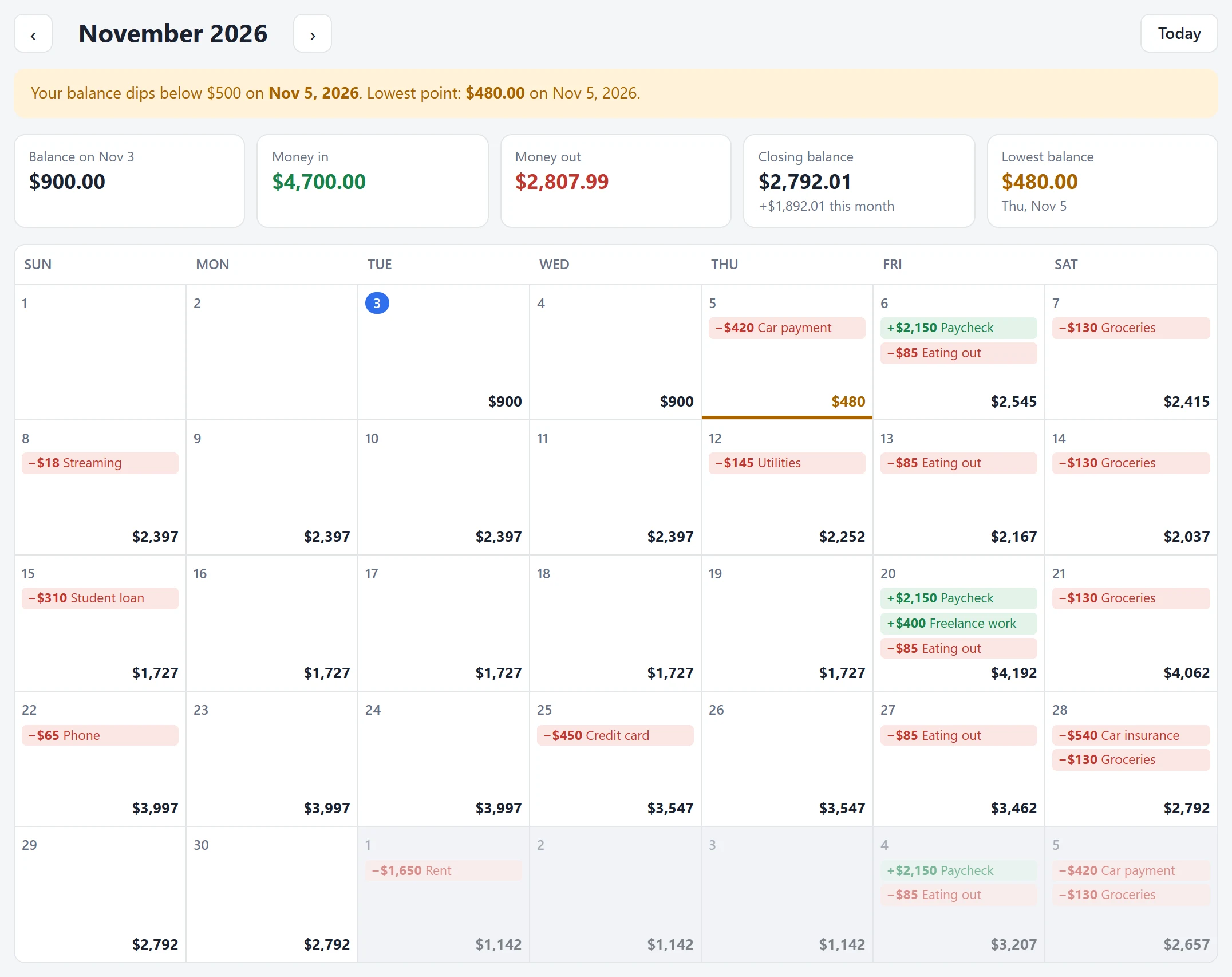
Each day’s end-of-day balance sits in the corner of its square. -
02
Which day things get tight — weeks before it happens.
Pick the balance you never want to go below. Cashflow Calendar scans the next 12 months and tells you the first day you’ll cross it, so you can move a bill or hold off on a purchase while there’s still time.
- Low days marked in amber, negative days in red
- Your lowest point for the year, with its date
- “Show me” jumps straight to the problem month

The month at a glance: money in, money out, and your lowest balance. -
03
What happens if you get a raise, move, or cut a bill.
Every income and expense has a slider. Drag it and the whole calendar recalculates as you move — then a banner tells you how far ahead (or behind) you’d be a year from now. Like it? Apply it. Don’t? Reset in one click.
- Try anything from cutting a bill to 0% to doubling it
- See “what-if” vs. your plan side by side
- Nothing changes until you choose to apply it
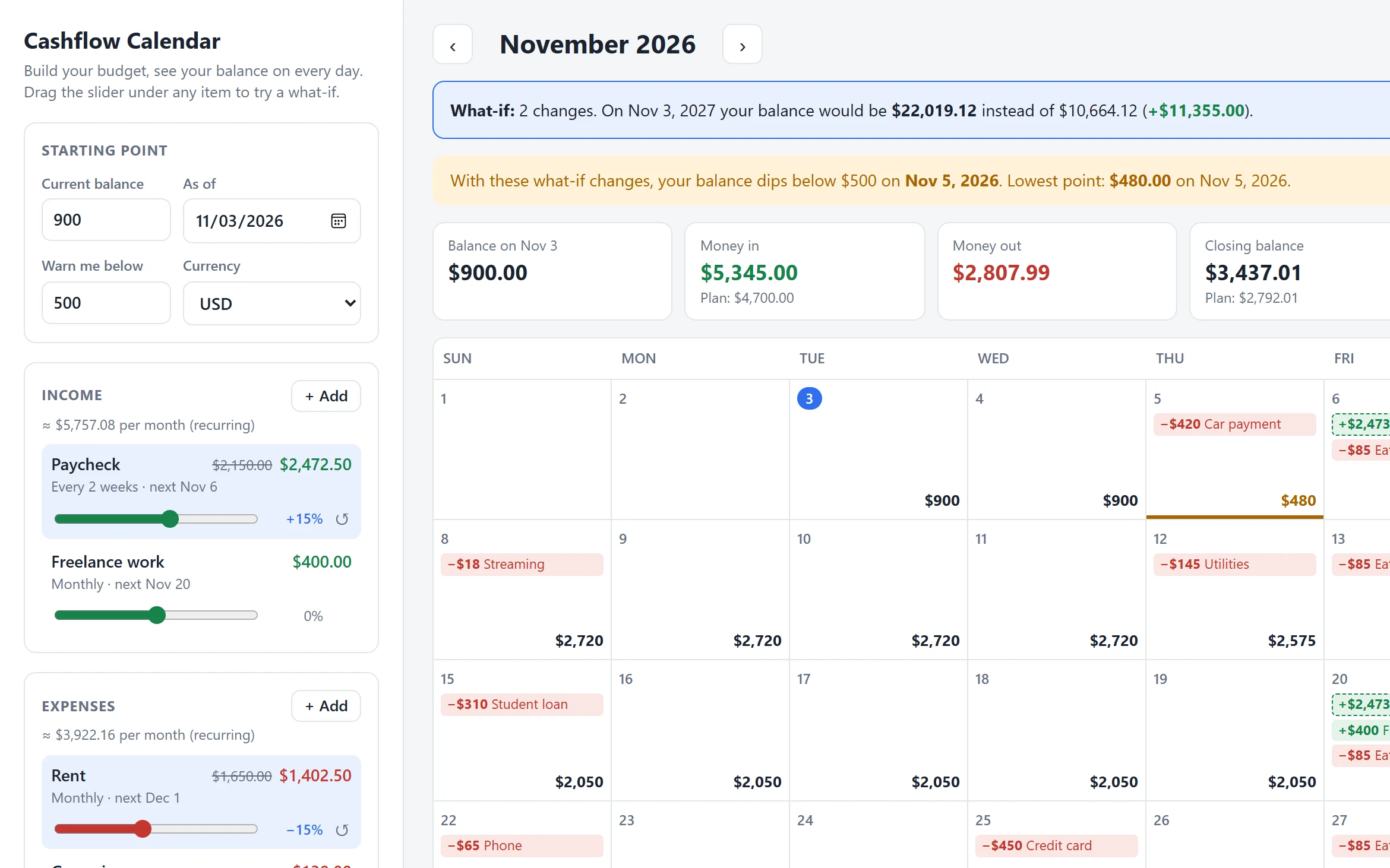
A 15% raise and 15% cheaper rent — and what it means a year out. -
04
Every bill, on its real schedule — entered once.
Add a bill once and tell Cashflow Calendar how often it repeats. It fills in every future date for you, including the awkward ones, like a bill due on the 31st in a 30-day month.
- One-time, daily, weekly, every 2 weeks, monthly, every 3 months, yearly
- Optional end date for loans and subscriptions that stop
- Month-end dates handled automatically
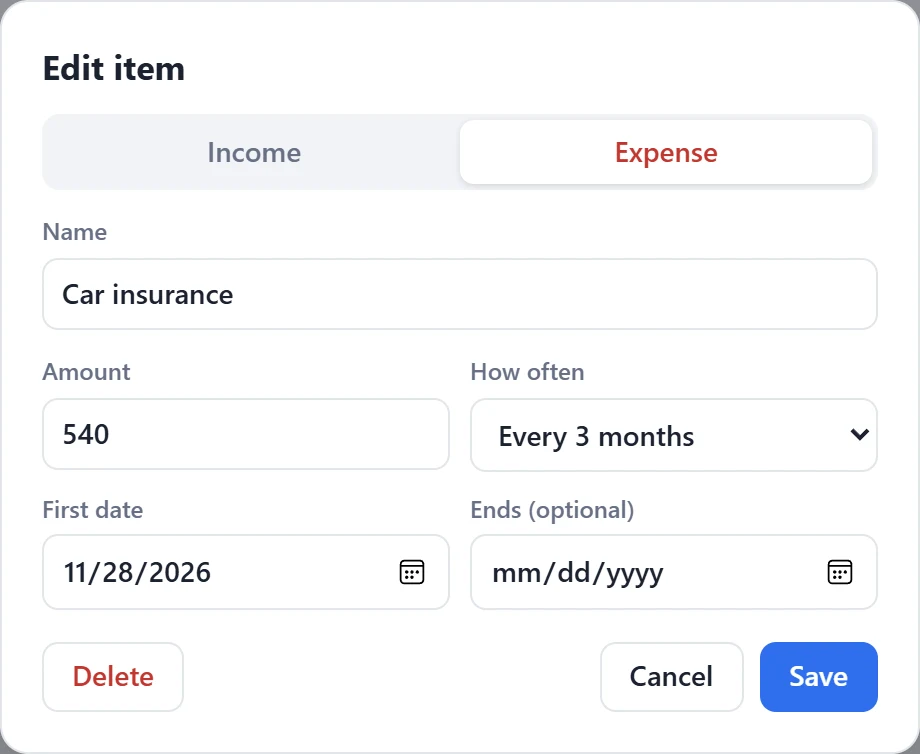
Quarterly car insurance: set it once, see it every three months. -
05
Where your money actually goes each month.
Below the calendar, clean charts explain the month: your balance over the next year, your biggest expenses, and a step-by-step view of how you get from the first of the month to the last.
- Balance-over-time line with your lowest point marked
- Spending breakdown and a month “waterfall”
- Every chart can switch to a plain table
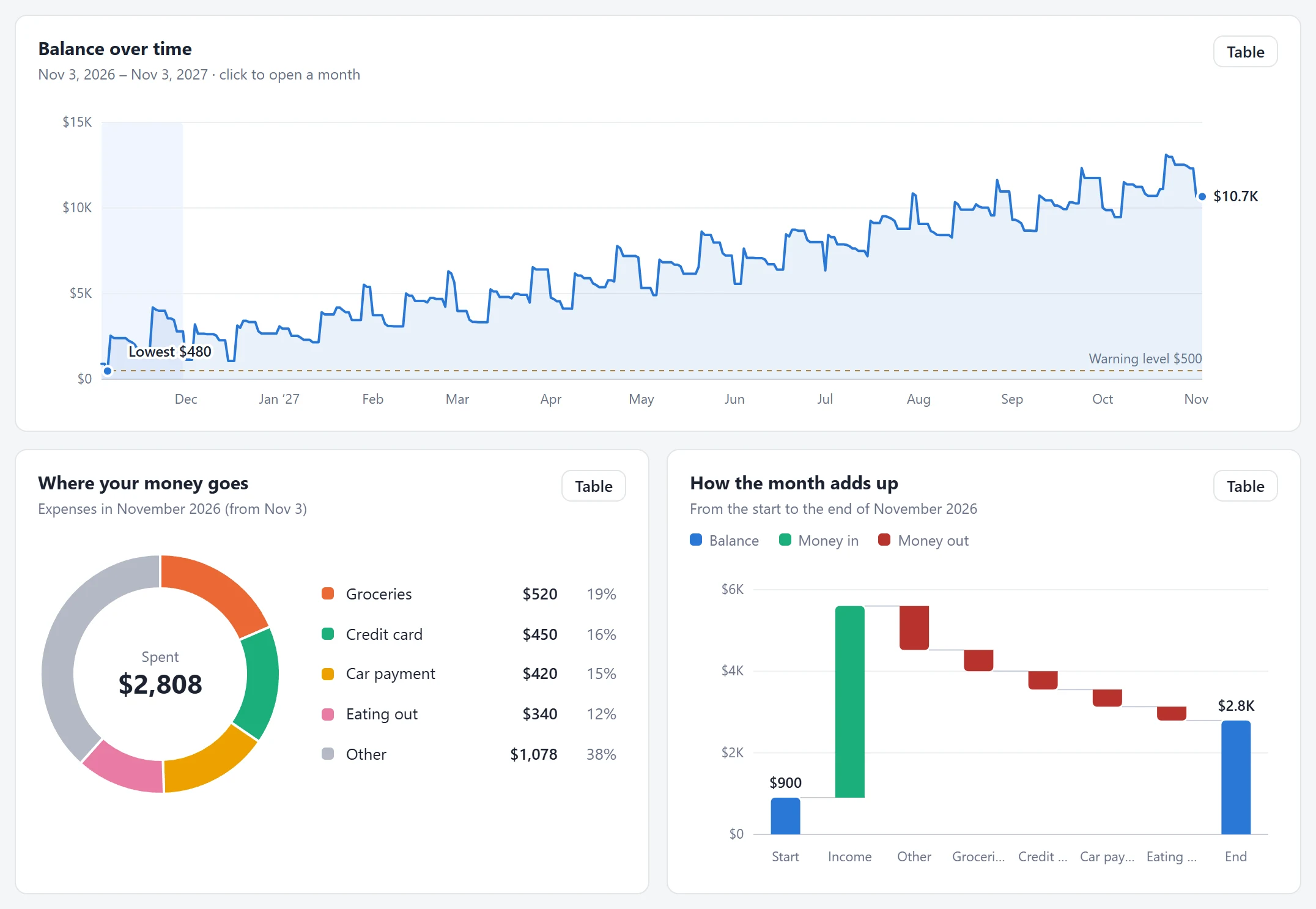
The charts update with every change, including what-if sliders. -
06
Which months are going to be expensive.
Quarterly insurance, holiday gifts, annual renewals — some months simply cost more. A 12-month view of money in vs. money out puts the heavy months in plain sight. Click any month to open it on the calendar.
- Twelve months of income and spending, side by side
- Hover any month for its net total
- One click to jump to that month
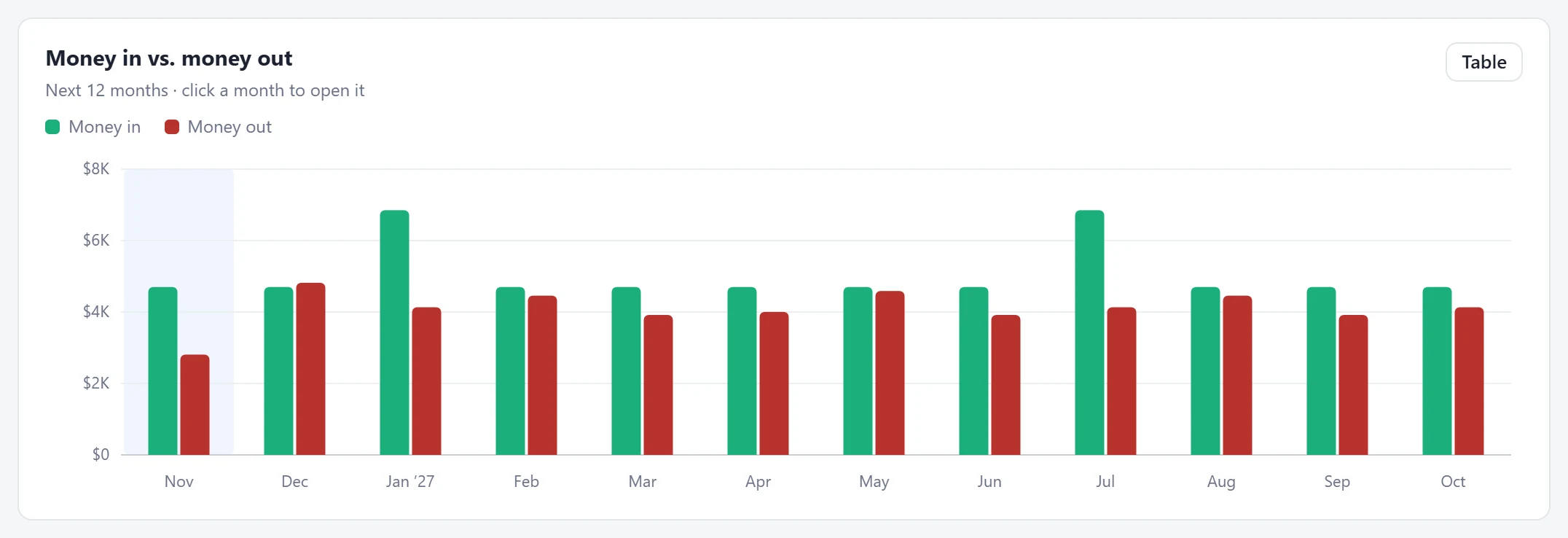
Spot the spiky months before they arrive. -
07
That your financial data stays yours.
Cashflow Calendar isn’t a website you log into. It runs on your own computer, in the browser you already use. There’s no account, no bank connection, and no server collecting your numbers.
- Your budget is saved only on your computer
- Works without an internet connection
- Export a backup file anytime, import it anywhere
Runs on your computerOpen it like any file. No install wizard.No account, no bank loginYou type in your income and bills yourself.Works offlineNo internet needed once it’s on your machine.
Pay once. Get your link. Run it on your own computer.
Cashflow Calendar isn’t hosted online — that’s the point. After payment, you’ll receive a private link to download it and run it locally on your machine.
-
Complete your payment
Check out securely. It takes about a minute.
-
Receive your download link
As soon as your payment goes through, you’ll receive a link to download Cashflow Calendar as a single folder.
-
Open it on your computer
Unzip the folder and double-click the file below. It opens in your web browser and runs entirely on your machine.
📄 index.html
Start seeing next month today.
- The full app, downloaded to your computer
- Daily balance calendar with 12-month forecast
- Low-balance warnings
- What-if sliders for every income and expense
- Four charts, each with a table view
- Export and import backups
- Light and dark mode
After payment you’ll receive a link to download Cashflow Calendar and run it locally.
Good to know
How do I get Cashflow Calendar after I pay?
Once your payment is complete, you’ll receive a link to download the app. Unzip the folder and double-click index.html — it opens in your browser and runs locally on your computer.
Do I need to install anything?
No. There’s no installer and no extra software. You just need a modern web browser such as Chrome, Edge, Firefox or Safari, which you almost certainly already have.
Where is my budget stored?
In your browser’s storage, on your computer. It is never sent to us or anyone else. That also means it stays in that browser on that computer — use Export to save a backup file or move your budget somewhere else.
What happens if I clear my browser data?
Clearing your browser’s site data can erase your saved budget, just like it erases other saved website data. Export a backup now and then, and you can import it again in seconds.
Does it connect to my bank?
No. You enter your income and bills yourself. That keeps your banking login out of the picture entirely, and most budgets only take a few minutes to set up.
Do I need an internet connection?
Only to download it. After that, Cashflow Calendar works completely offline.
Which currencies does it support?
US dollar, euro, British pound, Canadian dollar, Australian dollar, Brazilian real, Mexican peso, Japanese yen, Indian rupee and Swiss franc.
Is this financial advice?
No. Cashflow Calendar is a planning tool. Its forecast is based entirely on the amounts and dates you enter, so it’s only as accurate as your budget.
Stop guessing about the 28th. Know.
See your balance on every day, catch the tight spots early, and keep your numbers on your own computer.
Get Cashflow Calendar — $29